A Shopify store locator without an app, and how far it scales
For a few dozen locations, a store list in your theme is faster and easier to maintain than an app. Somewhere past that, it stops being the right tool, and the reason isn't the map.
Key takeaways
- A directions link needs no API key at all: Google's Maps URLs work from the address alone.
- An embedded map does need a key, though Google lists the Maps Embed API as no charge. Load it on tap, so the page stays fast and no third-party frame appears until someone asks.
- Sections cap out at 50 blocks. Metaobjects take you further, and ZIP code search with real distances is the point where an app or a geocoding service earns its keep.
- Every location rendered as plain HTML can be read by search engines and used without JavaScript, which is something maps drawn only by a script can't offer.
Take a made-up brand, Harbor Hot Sauce. It sells online and through 18 independent grocers and bars, and it gets the same email every week: "Where can I buy this near me?" The owner looks at store locator apps and notices that the page she actually needs is a list with a search box and a Directions button on each row. She doesn't need a live map for that. She might not need an app either.
If you're at about that scale, here's the whole thing as a section. Further down is how to tell when you've outgrown it.
The store list section
Each location is a block with a name, town, address, phone number, opening hours and optional website. The search filters by whatever's in those fields, so a shopper can type a town, a ZIP code or a shop name, provided that text is in the block. Without JavaScript the search box stays hidden and the full list still shows, with all its links working.
{%- assign sid = 'loc-' | append: section.id -%}
{% style %}
#{{ sid }} { max-width: 960px; margin: 0 auto; padding: 48px 16px; color: {{ section.settings.text }}; }
#{{ sid }} h2 { margin: 0 0 8px; color: inherit; }
#{{ sid }} .loc__search { display: none; margin: 20px 0 8px; }
#{{ sid }}.is-ready .loc__search { display: block; }
#{{ sid }} .loc__search label { display: block; margin-bottom: 6px; font-size: 14px; }
#{{ sid }} .loc__search input { width: 100%; min-height: 48px; padding: 0 12px; font-size: 16px; color: inherit; background: none; border: 1px solid currentColor; border-radius: 8px; }
#{{ sid }} .loc__count { margin: 0 0 16px; font-size: 14px; min-height: 20px; }
#{{ sid }} .loc__list { display: grid; gap: 16px; grid-template-columns: repeat(auto-fill, minmax(280px, 1fr)); list-style: none; margin: 0; padding: 0; }
#{{ sid }} .loc__item { padding: 18px; background: {{ section.settings.card }}; border-radius: 10px; }
#{{ sid }} .loc__item[hidden] { display: none; }
#{{ sid }} .loc__name { margin: 0 0 2px; font-size: 18px; color: inherit; }
#{{ sid }} .loc__town, #{{ sid }} .loc__address, #{{ sid }} .loc__hours { margin: 0 0 8px; font-size: 14px; }
#{{ sid }} .loc__actions { display: flex; flex-wrap: wrap; gap: 8px 16px; margin-top: 12px; font-size: 14px; }
#{{ sid }} .loc__actions a, #{{ sid }} .loc__map-btn { min-height: 44px; display: inline-flex; align-items: center; padding: 0; font: inherit; color: inherit; text-decoration: underline; background: none; border: 0; cursor: pointer; }
#{{ sid }} .loc__map-frame { display: block; width: 100%; height: 280px; margin-top: 12px; border: 0; border-radius: 8px; }
#{{ sid }} a:focus-visible, #{{ sid }} button:focus-visible, #{{ sid }} input:focus-visible { outline: 2px solid currentColor; outline-offset: 2px; }
#{{ sid }} .loc__item { transition: box-shadow .2s ease; }
@media (prefers-reduced-motion: reduce) { #{{ sid }} .loc__item { transition: none; } }
{% endstyle %}
<div
id="{{ sid }}"
data-locator
data-count="{{ section.settings.count_text | escape }}"
data-none="{{ section.settings.none_text | escape }}"
data-key="{{ section.settings.maps_key | escape }}"
data-map-title="{{ section.settings.map_title | escape }}"
style="background: {{ section.settings.background }};"
>
<h2>{{ section.settings.heading | escape }}</h2>
{{ section.settings.intro }}
<div class="loc__search">
<label for="{{ sid }}-q">{{ section.settings.search_label | escape }}</label>
<input id="{{ sid }}-q" type="search" autocomplete="off" placeholder="{{ section.settings.search_placeholder | escape }}">
</div>
<p class="loc__count" role="status" data-status></p>
<ul class="loc__list">
{%- for block in section.blocks -%}
{%- assign address = block.settings.address -%}
{%- capture haystack -%}{{ block.settings.name }} {{ block.settings.town }} {{ address }}{%- endcapture -%}
<li class="loc__item" data-search="{{ haystack | downcase | escape }}" {{ block.shopify_attributes }}>
<h3 class="loc__name">{{ block.settings.name | escape }}</h3>
{%- if block.settings.town != blank -%}
<p class="loc__town">{{ block.settings.town | escape }}</p>
{%- endif -%}
<p class="loc__address">{{ address | escape }}</p>
{%- if block.settings.hours != blank -%}
<p class="loc__hours">{{ block.settings.hours | escape | newline_to_br }}</p>
{%- endif -%}
<div class="loc__actions">
<a href="https://www.google.com/maps/dir/?api=1&destination={{ address | url_encode }}" target="_blank" rel="noopener">{{ section.settings.directions_label | escape }}</a>
{%- if block.settings.phone != blank -%}
<a href="tel:{{ block.settings.phone | remove: ' ' | escape }}">{{ section.settings.call_label | escape }}</a>
{%- endif -%}
{%- if block.settings.website != blank -%}
<a href="{{ block.settings.website }}" target="_blank" rel="noopener">{{ section.settings.website_label | escape }}</a>
{%- endif -%}
{%- if section.settings.maps_key != blank -%}
<button type="button" class="loc__map-btn" data-map="{{ address | url_encode }}">{{ section.settings.map_label | escape }}</button>
{%- endif -%}
</div>
</li>
{%- endfor -%}
</ul>
</div>
<script>
(function () {
function init(root) {
if (!root || root.dataset.ready) return;
root.dataset.ready = '1';
root.classList.add('is-ready');
var input = root.querySelector('input[type="search"]');
var status = root.querySelector('[data-status]');
var rows = [].slice.call(root.querySelectorAll('[data-search]'));
function filter() {
var words = input.value.toLowerCase().split(' ').filter(Boolean);
var shown = 0;
rows.forEach(function (row) {
var match = words.every(function (word) { return row.dataset.search.indexOf(word) > -1; });
row.hidden = !match;
if (match) shown += 1;
});
status.textContent = shown ? root.dataset.count.replace('[count]', shown) : root.dataset.none;
}
input.addEventListener('input', filter);
root.addEventListener('click', function (event) {
var button = event.target.closest('[data-map]');
if (!button) return;
var frame = document.createElement('iframe');
frame.className = 'loc__map-frame';
frame.loading = 'lazy';
frame.title = root.dataset.mapTitle;
frame.referrerPolicy = 'no-referrer-when-downgrade';
frame.src = 'https://www.google.com/maps/embed/v1/place?key=' + encodeURIComponent(root.dataset.key) + '&q=' + button.dataset.map;
button.closest('.loc__item').appendChild(frame);
button.remove();
});
filter();
}
init(document.getElementById('{{ sid }}'));
document.addEventListener('shopify:section:load', function (event) {
init(event.target.querySelector('[data-locator]'));
});
document.addEventListener('shopify:block:select', function (event) {
if (event.target.matches('[data-search]')) event.target.hidden = false;
});
})();
</script>
{% schema %}
{
"name": "Store list",
"tag": "section",
"max_blocks": 50,
"settings": [
{ "type": "text", "id": "heading", "label": "Heading", "default": "Where to buy" },
{ "type": "richtext", "id": "intro", "label": "Intro" },
{ "type": "text", "id": "search_label", "label": "Search label", "default": "Search by town, ZIP code or shop" },
{ "type": "text", "id": "search_placeholder", "label": "Search placeholder", "default": "Type a town" },
{ "type": "text", "id": "count_text", "label": "Results message", "default": "[count] locations", "info": "[count] is filled in." },
{ "type": "text", "id": "none_text", "label": "No results message", "default": "No locations match. Try a nearby town." },
{ "type": "text", "id": "directions_label", "label": "Directions link", "default": "Directions" },
{ "type": "text", "id": "call_label", "label": "Phone link", "default": "Call" },
{ "type": "text", "id": "website_label", "label": "Website link", "default": "Website" },
{ "type": "text", "id": "map_label", "label": "Map button", "default": "Show map" },
{ "type": "text", "id": "map_title", "label": "Map title for screen readers", "default": "Map of this location" },
{ "type": "text", "id": "maps_key", "label": "Google Maps Embed API key", "info": "Optional. Leave blank for no map buttons; Directions links work without it. Restrict the key to your domain." },
{ "type": "color", "id": "background", "label": "Background", "default": "#ffffff" },
{ "type": "color", "id": "card", "label": "Card background", "default": "#f4f2ee" },
{ "type": "color", "id": "text", "label": "Text", "default": "#1a1a1a" }
],
"blocks": [
{
"type": "location",
"name": "Location",
"settings": [
{ "type": "text", "id": "name", "label": "Name", "default": "Shop name" },
{ "type": "text", "id": "town", "label": "Town or area" },
{ "type": "text", "id": "address", "label": "Full address", "default": "12 Example Street, Town, ZIP", "info": "Used for the Directions link and the map." },
{ "type": "textarea", "id": "hours", "label": "Opening hours" },
{ "type": "text", "id": "phone", "label": "Phone" },
{ "type": "url", "id": "website", "label": "Website" }
]
}
],
"presets": [
{
"name": "Store list",
"blocks": [ { "type": "location" }, { "type": "location" }, { "type": "location" } ]
}
]
}
{% endschema %}Installing it works like any section: add the file, then add the section to a page template. A dedicated page.stores template keeps it off your other pages. If you edit the schema, the schema generator will catch mistakes before Shopify refuses the save.
Directions link or embedded map?
These look like two versions of one feature, but they have different costs. A directions link sends the shopper to Google Maps, which on a phone usually means their maps app, already knowing where they are. An embedded map shows the location on your page but can't route them without another tap.
| Directions link | Embedded Google map | |
|---|---|---|
| API key | None | Required, from a Google Cloud project |
| Cost | None | Google lists Maps Embed API requests as no charge, but check your own Cloud console |
| Page weight | A link | A full third-party page per map, so load it on request |
| Shows many pins at once | No | Not in place mode, which shows one location per frame |
| Shopper's next step | Routes straight away | Needs another tap to start routing |
The link uses Google's documented Maps URLs format, https://www.google.com/maps/dir/?api=1&destination= plus the encoded address. If you leave out api=1, Google ignores the other parameters. That's why the section always builds it with url_encode from one address field.
The map is opt-in by design. The frame isn't created until someone taps Show map, so 18 stores don't mean 18 maps on load, and visitors who only want an address don't load a Google frame at all. If you need consent before third-party content, that tap helps, but it may not be enough by itself in your jurisdiction, so check your cookie setup. Because a theme's key is visible in the page source, restrict it to your domain and the Embed API in Google's console.
A map with every pin at once needs a JavaScript map library, a key with billing, and code of its own. Another route skips map providers: use your own illustrated map as an image and place pins by percentage. That's what the Stockist Map section below does, and it suits a single city far better than a whole country.
How far this scales
Shopify's limit is 50 blocks per section. The real limit often arrives earlier, since typing 40 addresses into a theme editor sidebar, and keeping them current, gets tedious. Here's roughly how the options line up:
| Locations | Good fit | What you give up |
|---|---|---|
| Up to 20 or so | The blocks above | Nothing that matters at this size |
| 20 to 50 | Blocks, plus some patience | Bulk editing. A second section per region helps. |
| 50 to a few hundred | A metaobject definition with one entry per location, rendered with paginate | Editor previews of each location, and a heavier page |
| Hundreds or thousands | A locator app or your own service | Simplicity, in return for import, geocoding and radius search |
Metaobjects move the data into Content › Metaobjects, where a location isn't tied to one section. In Liquid, the docs cap a plain loop at 50 entries and let values paginate up to 250 per page:
{%- comment -%} Assumes a metaobject definition of type "stockist" with name and address fields. {%- endcomment -%}
{% paginate metaobjects.stockist.values by 250 %}
  {%- for location in metaobjects.stockist.values -%}
    <li data-search="{{ location.name.value | downcase | escape }} {{ location.address.value | downcase | escape }}">
      <h3>{{ location.name.value | escape }}</h3>
      <p>{{ location.address.value | escape }}</p>
    </li>
  {%- endfor -%}
{% endpaginate %}
If you have 500 stores and shoppers expect to type a ZIP code and see the nearest ten, a text filter won't do it. A search for "90210" only matches stores whose text contains it, and it has no idea that a store in 90211 is next door. Radius search needs coordinates for each store, a way to turn the shopper's ZIP code into coordinates, and sorting by distance. Add spreadsheet import, a pin map with clustering, and syncing with your retail system, and that's the job a locator app is built for.
In between, there's a partial step: store latitude and longitude on each location, ask for the browser's position with navigator.geolocation, and sort by straight-line distance. It costs no API fees and the browser asks permission first, but it only works for people who agree to share their location, and it does nothing for a typed ZIP code.
Your own shops or someone else's?
If these are your own retail locations and you offer pickup, Liquid can show live stock per location through a variant's `store_availabilities`. That answers "can I collect this size today?", on a product page. It isn't a substitute for a where-to-buy page, and for third-party stockists Shopify has no data at all, so your section's blocks are the source of truth. Someone has to update them when a stockist closes, which is a good habit to put on a calendar whichever tool you use.
Two designed alternatives
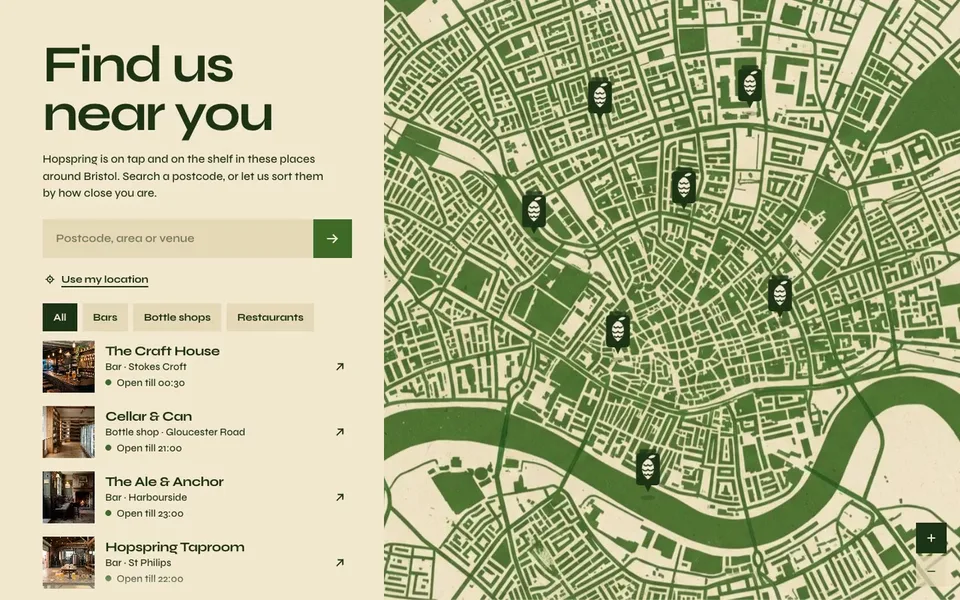
Neither is a substitute for radius search across a national network. If you want a variation on the code above, such as region tabs or a stockist type filter, describing it to the Klorr code generator gets you a section in the same one-file format.
Questions, answered
Can I add a store locator to Shopify without an app?
Yes, for up to about 50 locations with section blocks, or a few hundred using metaobjects. You get a searchable list and directions links with no app and no API key. ZIP code radius search across many stores is where an app becomes the better choice.
Do I need a Google Maps API key for a Shopify store locator?
Not for directions links, because Google's Maps URLs work without a key. An embedded map through the Maps Embed API does require one, which Google lists as no charge. A map with many pins requires a JavaScript map API, which has its own billing.
How many locations can a Shopify section hold?
A section allows up to 50 blocks, so 50 locations if each is a block. You could use several sections, for instance one per region, or move the locations into a metaobject definition.
Why doesn't searching a ZIP code find the nearest store?
A text search only matches words in the store's details, with no idea of distance. Finding the nearest store needs coordinates for each store and for the shopper, which means geocoding or asking for the browser's location.
Will a store locator built this way show up in Google?
Rendered as plain HTML, every name and address is in the page source for search engines to read. Whether a given page ranks depends on far more than that, but nothing is hidden behind a script.