How to add an FAQ section to Shopify, and what FAQ schema does now
Older advice says FAQ schema earns you dropdowns in Google. Google removed those in 2026. An FAQ is still worth having, for the reasons that were always the better ones.
Key takeaways
- Google's changelog says FAQ rich results stopped appearing in Search from May 2026, and the feature's documentation has since been removed.
- The
detailsandsummaryelements give you a keyboard-ready accordion with no JavaScript, and addingnamemakes it open one answer at a time. - Your theme may already have this: Dawn's Collapsible content section covers a simple FAQ with no code.
- Write questions from your support inbox, and put answers that affect a purchase on the product page, where the doubt comes up.
Four things people get wrong about Shopify FAQs
"FAQ schema gets me expandable answers in Google"
Not anymore. Google had already limited FAQ rich results to government and health sites in 2023. Its Search Central changelog then said the feature would no longer appear in Google Search starting 7 May 2026, and a June 2026 entry says it's gone and the documentation has been removed. Any plugin or article promising FAQ dropdowns in Google results is out of date.
FAQPage is still valid schema.org vocabulary, and adding it does no harm when it matches the page, but on Google it earns no special display today. That's why it's an option in the section below, off by default. Other tools may read it, but none of them promises anything for it, so don't build a plan around it.
"So an FAQ is pointless for SEO"
The markup was the extra, while the words were always the value. An FAQ answers specific questions in the words people use ("can I wash this at 60", "do you ship to Norway"), and those are ordinary indexable text on your page. Because details keeps the closed answer in the HTML, a crawler gets it without running any script.
"An accordion needs JavaScript or an app"
It needs neither. <details> opens and closes natively, works with Enter and Space, and is announced as expandable by screen readers. Recent browsers also open a closed details for find-in-page in most cases, which a JavaScript accordion built on hidden divs often doesn't manage. The name attribute, shared across a group, gives you single-open behavior with no code; it's been supported across major browsers since 2024.
"Every store needs one long FAQ page"
A long page full of questions usually means a shopper has left the product to go looking. Questions about sizing or care work harder under the product they're about, while store-wide ones like returns and shipping fit a single page. Most stores benefit from both, a short list on the product page and a fuller one on its own page, with the answers kept consistent.
Check your theme first
Dawn and many Online Store 2.0 themes ship a section called Collapsible content. Add it, make one row per question, and you're done, with no code. Dawn's product section also has a Collapsible row block for the buy box. Reach for a custom section when you need something those don't offer: a specific layout, single-open behavior, your own styling, or the markup option.
A custom FAQ section
Each question is a block, so it can be added and dragged in the editor. Answers are richtext, so they can hold links and lists, which is also why they aren't escaped. For more on how block types and limits work, see how to add blocks to a section, which uses a smaller FAQ as its example.
<div class="faq-{{ section.id }}">
  <div class="faq-inner">
    {%- if section.settings.heading != blank -%}
      <h2 class="faq-heading">{{ section.settings.heading | escape }}</h2>
    {%- endif -%}
    {%- if section.settings.intro != blank -%}
      <div class="faq-intro">{{ section.settings.intro }}</div>
    {%- endif -%}

    {%- for block in section.blocks -%}
      <details
        class="faq-item"
        id="faq-{{ block.id }}"
        {% if section.settings.single_open %}name="faq-{{ section.id }}"{% endif %}
        {% if section.settings.open_first and forloop.first %}open{% endif %}
        {{ block.shopify_attributes }}
      >
        <summary class="faq-question">
          <span>{{ block.settings.question | escape }}</span>
          <svg class="faq-icon" width="16" height="16" viewBox="0 0 16 16" fill="none" stroke="currentColor" stroke-width="2" aria-hidden="true"><path d="M3 6l5 5 5-5"/></svg>
        </summary>
        <div class="faq-answer">{{ block.settings.answer }}</div>
      </details>
    {%- endfor -%}
  </div>
</div>

{%- if section.settings.structured_data and section.blocks.size > 0 -%}
  <script type="application/ld+json">
    {
      "@context": "https://schema.org",
      "@type": "FAQPage",
      "mainEntity": [
        {%- for block in section.blocks -%}
          {
            "@type": "Question",
            "name": {{ block.settings.question | json }},
            "acceptedAnswer": { "@type": "Answer", "text": {{ block.settings.answer | json }} }
          }{% unless forloop.last %},{% endunless %}
        {%- endfor -%}
      ]
    }
  </script>
{%- endif -%}

<style>
  .faq-{{ section.id }} {
    padding: {{ section.settings.padding }}px 16px;
    background: {{ section.settings.background }};
    color: {{ section.settings.ink }};
  }
  .faq-{{ section.id }} .faq-inner { max-width: 760px; margin: 0 auto; }
  .faq-{{ section.id }} .faq-heading { margin: 0 0 12px; }
  .faq-{{ section.id }} .faq-intro { margin-bottom: 20px; }
  .faq-{{ section.id }} .faq-item { border-top: 1px solid {{ section.settings.line }}; }
  .faq-{{ section.id }} .faq-item:last-child { border-bottom: 1px solid {{ section.settings.line }}; }
  .faq-{{ section.id }} .faq-question {
    display: flex;
    align-items: center;
    justify-content: space-between;
    gap: 16px;
    min-height: 44px;
    padding: 14px 0;
    font-weight: 600;
    list-style: none;
    cursor: pointer;
  }
  .faq-{{ section.id }} .faq-question::-webkit-details-marker { display: none; }
  .faq-{{ section.id }} .faq-question:focus-visible { outline: 2px solid currentColor; outline-offset: 2px; }
  .faq-{{ section.id }} .faq-icon { flex-shrink: 0; }
  .faq-{{ section.id }} [open] .faq-icon { transform: rotate(180deg); }
  .faq-{{ section.id }} .faq-answer { padding: 0 0 18px; }
  .faq-{{ section.id }} .faq-answer > :first-child { margin-top: 0; }
  .faq-{{ section.id }} .faq-answer > :last-child { margin-bottom: 0; }
  @media (prefers-reduced-motion: no-preference) {
    .faq-{{ section.id }} .faq-icon { transition: transform .2s ease; }
  }
</style>

<script>
  (function () {
    function openFromHash() {
      var target = location.hash && document.getElementById(location.hash.slice(1));
      if (target && target.tagName === 'DETAILS') target.open = true;
    }
    openFromHash();
    if (window.faqAccordionBound) return;
    window.faqAccordionBound = true;
    window.addEventListener('hashchange', openFromHash);
    // Bound to the document, so a section re-rendered in the theme editor still responds.
    document.addEventListener('shopify:block:select', function (event) {
      if (event.target.matches('details.faq-item')) event.target.open = true;
    });
  })();
</script>

{% schema %}
{
  "name": "FAQ accordion",
  "tag": "section",
  "max_blocks": 30,
  "settings": [
    { "type": "text", "id": "heading", "label": "Heading", "default": "Questions we get a lot" },
    { "type": "richtext", "id": "intro", "label": "Introduction" },
    { "type": "checkbox", "id": "single_open", "label": "Open one answer at a time", "default": false },
    { "type": "checkbox", "id": "open_first", "label": "Open the first answer", "default": true },
    {
      "type": "checkbox",
      "id": "structured_data",
      "label": "Add FAQPage structured data",
      "default": false,
      "info": "Google no longer shows FAQ rich results. Use only one FAQPage per page, and only with answers visible on it."
    },
    { "type": "range", "id": "padding", "label": "Space above and below", "min": 0, "max": 80, "step": 4, "unit": "px", "default": 40 },
    { "type": "color", "id": "background", "label": "Background", "default": "#ffffff" },
    { "type": "color", "id": "ink", "label": "Text", "default": "#1a1a1a" },
    { "type": "color", "id": "line", "label": "Lines", "default": "#e4e4e4" }
  ],
  "blocks": [
    {
      "type": "question",
      "name": "Question",
      "settings": [
        { "type": "text", "id": "question", "label": "Question", "default": "How long does delivery take?" },
        { "type": "richtext", "id": "answer", "label": "Answer", "default": "<p>Write the answer here, with a real number of days for your main market.</p>" }
      ]
    }
  ],
  "presets": [
    {
      "name": "FAQ accordion",
      "blocks": [
        { "type": "question" },
        { "type": "question", "settings": { "question": "What is your returns policy?" } },
        { "type": "question", "settings": { "question": "Do you ship internationally?" } }
      ]
    }
  ]
}
{% endschema %}
A few details worth noticing. | json on the question and answer produces correctly escaped strings for the JSON-LD, so an apostrophe or a quote can't break it. list-style: none and the -webkit-details-marker rule remove the default triangle in favor of the icon. The id on each item lets you link straight to an answer, and the short script opens it when someone arrives on that link. Because details works on its own, the accordion keeps working if the script never runs.
Adding it to your store
Create the section file
Follow how to add a custom section to Shopify and name the file
faq-accordion.Make a template for the FAQ page
In the theme editor's page menu, choose Pages › Create template, and name it
faq. Add the section to it.Create the page
In Online Store › Pages, add a page called FAQ, set its theme template to
page.faq, and link it in your footer menu.Write your questions
Add one block per question and drag them into the order people need, with the common ones first.
Add a short version to products
Add the same section to your product template with the few questions that block a purchase. Text in the section stays the same for all products using that template.
Choosing questions that are worth the space
A good FAQ is a list of what stops people buying, and you already have the evidence. Search your support inbox for the last few months and count what repeats. Also look at live chat logs, pre-sale emails, and review text where someone says "I wasn't sure whether".
| Usually worth including | Usually not |
|---|---|
| Delivery time and cost to your main countries, in numbers | "Why choose us?", which nobody has asked |
| What happens if it doesn't fit, or arrives broken | A restatement of your whole returns policy; link to it |
| Materials, allergens, care, compatibility with named devices | Marketing lines reworded as questions |
| Whether a preorder charges now or at dispatch | Questions you would be glad nobody asked, written to look transparent |
Put the answer in the first sentence. "Yes, to most EU countries, in 3 to 5 working days" beats a paragraph that arrives there eventually. Keep policy facts in one place where you can: if shipping times appear in the FAQ, the footer, a policy page and a banner, one of them will go stale, and a wrong delivery promise is worse than none. Answers can link to the policy page for the fine print.
If you have more than about 15 questions, sort them under subheadings with separate sections, one per topic, each with its own heading. Thirty collapsed rows in one list are hard to scan. At that size, search also starts earning its place.
When a plain accordion stops being enough
This section is a list of questions, and that's all it is. It has no search, no photos and no topic filter. These three show what those additions look like, and each goes after a different problem.

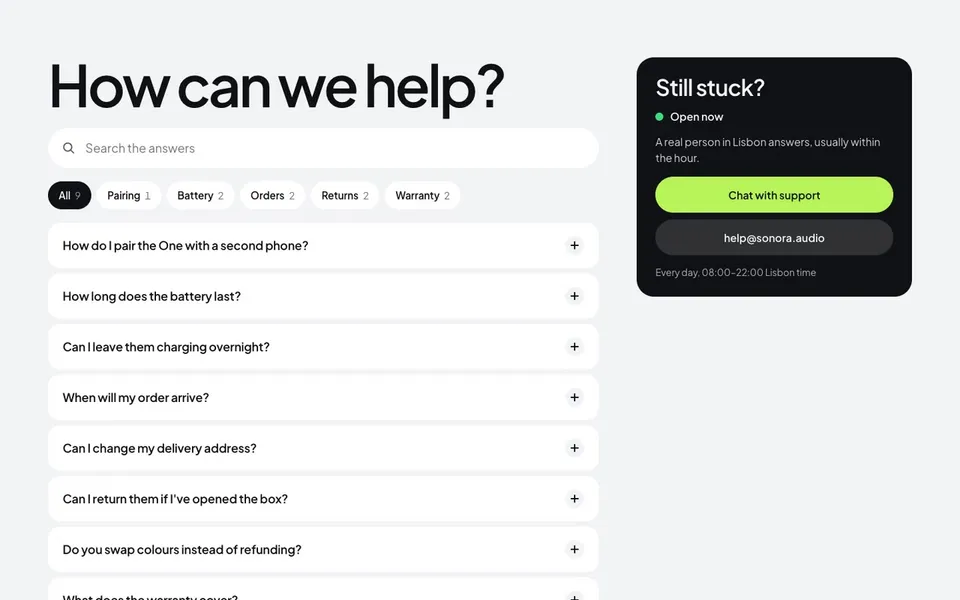
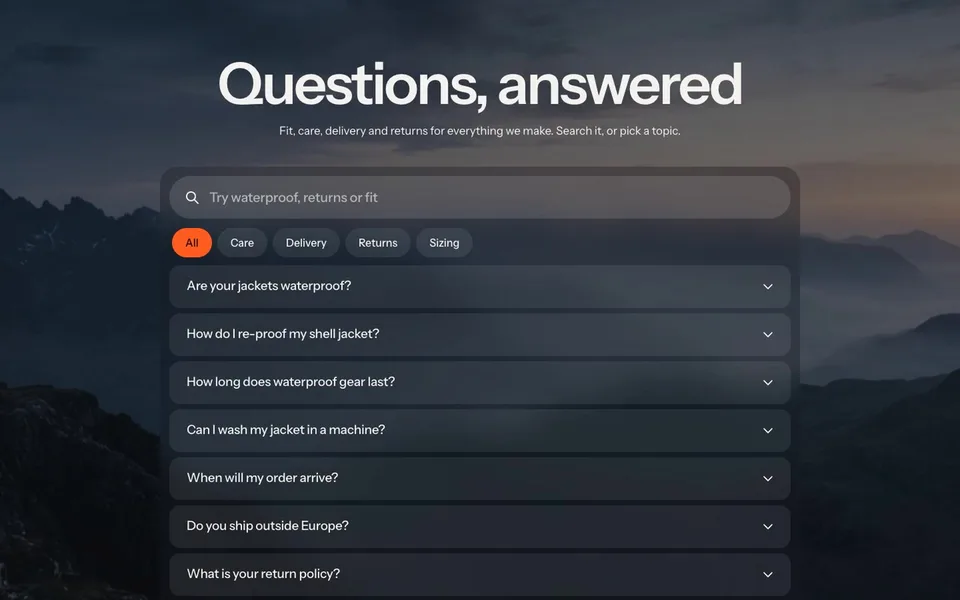
A help center app is the better choice once you need ticket deflection reports, article analytics, or a knowledge base shared with your support tool. Most stores' FAQs don't reach that point. If you need a layout between these, Klorr can write one from a description, with every question as a block.
Questions, answered
How do I add an FAQ section to my Shopify store?
First check your theme for a Collapsible content section, which needs no code. Otherwise add a custom section file like the one in this post, add it to a page template in the theme editor, and write one block per question.
Does FAQ schema still work on Google?
It no longer produces a special result. Google's Search Central changelog says FAQ rich results stopped appearing in Google Search from 7 May 2026, and it has removed the documentation. The markup itself is still valid schema.org and harmless if it matches the page.
Should FAQs go on the product page or their own page?
Both have a place. Put questions about that specific product, such as fit or care, on the product page where the doubt arises. Keep store-wide questions, such as shipping and returns, on a single FAQ page linked from the footer.
Is text in a closed accordion still indexed?
With details and summary, the answer is in the page's HTML whether open or closed, so crawlers can read it without running a script. Answers loaded only after a click are a different case, so avoid that.
How do I make my Shopify FAQ open one answer at a time?
Give every details element in the group the same name attribute. Browsers then close the others when one opens, with no JavaScript. The section here has a setting for it.