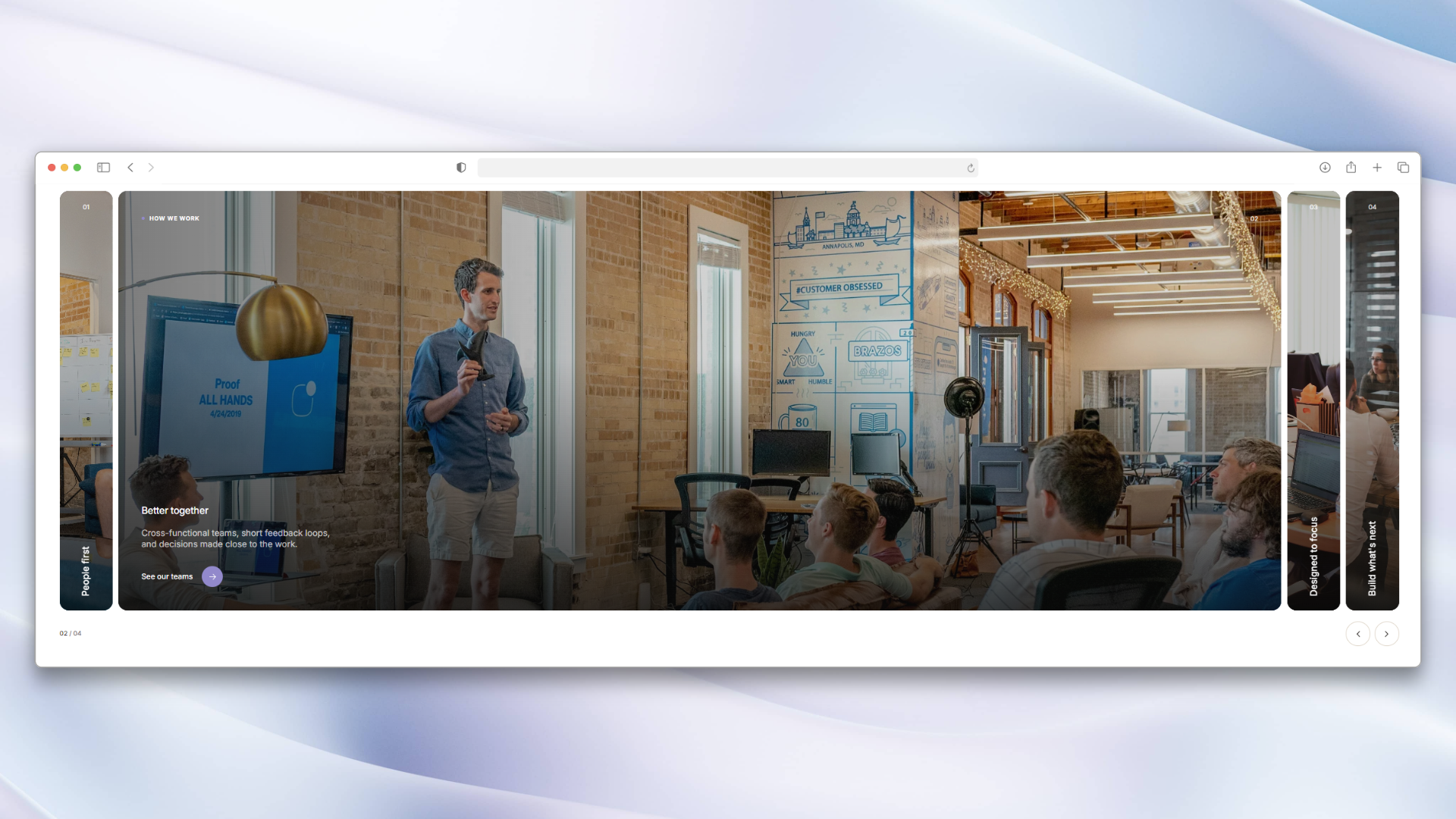
Expanding Photo Panels — Interactive Image AccordionShopify feature section
 chuck-lin
New
Paid once, yours to keep.
Turn a plain row of photos into a story shoppers actually want to open. One panel expands with the full story while the rest stay as slim vertical tabs. Click a tab, tap an arrow, or jump with the progress bars — the next panel opens instantly. Perfect for lookbooks, collection stories, ingredients, room tours, brand values, or behind-the-scenes edits. Every panel has its own image, eyebrow, heading, text, and link, and everything is editable in the Shopify theme editor. No app, no code, no theme-specific snippets. Works on any Online Store 2.0 theme and stacks beautifully on mobile.
What this Shopify section does
WHY THIS SECTION GETS OPENED
Most image rows are looked at for one second. This one invites a click. Closed panels tease the story with a vertical title; the open panel rewards the click with the full copy and a clear link. It turns a static gallery into a small interactive story — without an app or a page builder.
WHAT SHOPPERS CAN DO
WHAT YOU CAN EDIT
Per panel: image, eyebrow, heading, text, link label, and link.
Section: custom font sizes and weights for heading, subheading, text, and eyebrow; wide or normal width; accent color; top, bottom, left, and right padding. Up to 6 panels per section.
WHERE IT WORKS BEST
Lookbooks, seasonal edits, collection stories, ingredient breakdowns, room-by-room tours, brand values, founder notes, and feature comparisons.
INSTALL IN 2 MINUTES
1. Online Store > Themes > duplicate your theme.
2. On the copy: ... > Edit code > Sections > Add a new section.
3. Name it expanding-panels and paste this file.
4. Save, then open Customize and add "Expanding Panels".
5. Edit the panels and publish.
COMPATIBILITY
Built for Online Store 2.0 themes. Standard Liquid, section schema, inline stylesheet and JavaScript. No app, no external assets, no theme-specific snippets. Validated with Shopify Theme Check: 0 offenses.
SEO NOTE
The section renders real HTML text for every panel, not images of text, so headings, descriptions, and links stay crawlable and indexable. You control the heading and copy per panel in the theme editor.
- Click or tap any closed strip to open its panel
- Move one panel forward or back with the arrows
- Jump straight to a panel with the progress bars
- Swipe through the stacked version on mobile
- Read the open panel with keyboard and screen-reader support
- Clean Liquid with a complete
{% schema %} - Editable in the Shopify theme editor, like any other section
- Works on any Online Store 2.0 theme
- Pasted into your own theme, with no app on your storefront