A scrolling announcement bar for Shopify, with the code
Paste the section, drag it above the header, and it runs. The notes under the code explain the three places these bars usually go wrong.
Key takeaways
- Two identical lists moving by exactly their own width make a loop with no visible jump. No JavaScript is needed for the movement.
- Text that moves for more than five seconds needs a way to stop it, and hover doesn't exist on a phone, so include a real pause button.
- When a visitor asks for reduced motion, show the messages still, and remove the duplicate list from the page.
- The bar goes above the header through the header section group, by dragging in the theme editor's sidebar.
<marquee-bar
  class="sab-{{ section.id }}"
  role="region"
  aria-label="{{ section.settings.region_label | escape }}"
  data-speed="{{ section.settings.speed }}"
>
  <div class="sab-view">
    {%- for copy in (1..2) -%}
      <ul class="sab-group" role="list" {% if copy == 2 %}aria-hidden="true"{% endif %}>
        {%- for block in section.blocks -%}
          <li class="sab-item" {% if copy == 1 %}{{ block.shopify_attributes }}{% endif %}>
            {%- if block.settings.link != blank -%}
              <a href="{{ block.settings.link }}" {% if copy == 2 %}tabindex="-1"{% endif %}>{{ block.settings.text | escape }}</a>
            {%- else -%}
              <span>{{ block.settings.text | escape }}</span>
            {%- endif -%}
            <span class="sab-sep" aria-hidden="true">{{ section.settings.separator | escape }}</span>
          </li>
        {%- endfor -%}
      </ul>
    {%- endfor -%}
  </div>
  <button
    type="button"
    class="sab-toggle"
    aria-pressed="false"
    data-pause="{{ section.settings.pause_label | escape }}"
    data-play="{{ section.settings.play_label | escape }}"
  >{{ section.settings.pause_label | escape }}</button>
</marquee-bar>

<style>
  .sab-{{ section.id }} {
    --sab-dur: 30s;
    --sab-gap: 32px;
    display: flex;
    align-items: center;
    background: {{ section.settings.background }};
    color: {{ section.settings.text_color }};
    font-size: {{ section.settings.text_size }}px;
  }
  .sab-{{ section.id }} .sab-view {
    display: flex;
    flex: 1;
    min-width: 0;
    overflow: hidden;
    padding: {{ section.settings.padding }}px 0;
  }
  .sab-{{ section.id }} .sab-group {
    display: flex;
    flex-shrink: 0;
    justify-content: space-around;
    gap: var(--sab-gap);
    min-width: 100%;
    margin: 0;
    padding: 0 var(--sab-gap) 0 0;
    list-style: none;
    white-space: nowrap;
    animation: sab-move var(--sab-dur) linear infinite;
  }
  .sab-{{ section.id }} .sab-item { display: flex; gap: var(--sab-gap); }
  .sab-{{ section.id }} a { color: inherit; }
  .sab-{{ section.id }}:hover .sab-group,
  .sab-{{ section.id }}:focus-within .sab-group,
  .sab-{{ section.id }}.is-paused .sab-group { animation-play-state: paused; }
  .sab-{{ section.id }} .sab-toggle {
    flex-shrink: 0;
    min-height: 32px;
    margin: 0 8px;
    padding: 0 10px;
    border: 1px solid currentColor;
    border-radius: 99px;
    background: {{ section.settings.background }};
    color: inherit;
    font: inherit;
    font-size: 12px;
    cursor: pointer;
  }
  @media (prefers-reduced-motion: reduce) {
    .sab-{{ section.id }} .sab-group {
      flex-wrap: wrap;
      justify-content: center;
      width: 100%;
      min-width: 0;
      padding: 0 16px;
      white-space: normal;
      animation: none;
    }
    .sab-{{ section.id }} .sab-group[aria-hidden="true"],
    .sab-{{ section.id }} .sab-sep,
    .sab-{{ section.id }} .sab-toggle { display: none; }
  }
  @keyframes sab-move {
    to { transform: translateX(-100%); }
  }
</style>

<script>
  if (!customElements.get('marquee-bar')) {
    customElements.define('marquee-bar', class extends HTMLElement {
      connectedCallback() {
        var bar = this;
        var group = this.querySelector('.sab-group');
        var button = this.querySelector('.sab-toggle');
        // A set speed in pixels per second, so a long list doesn't race and a short one doesn't crawl.
        this.observer = new ResizeObserver(function () {
          bar.style.setProperty('--sab-dur', group.offsetWidth / +bar.dataset.speed + 's');
        });
        this.observer.observe(group);
        button.addEventListener('click', function () {
          var paused = bar.classList.toggle('is-paused');
          button.setAttribute('aria-pressed', paused);
          button.textContent = paused ? button.dataset.play : button.dataset.pause;
        });
        // In the theme editor, hold still while a message is selected.
        this.addEventListener('shopify:block:select', function () { bar.classList.add('is-paused'); });
        this.addEventListener('shopify:block:deselect', function () {
          if (button.getAttribute('aria-pressed') !== 'true') bar.classList.remove('is-paused');
        });
      }
      disconnectedCallback() {
        if (this.observer) this.observer.disconnect();
      }
    });
  }
</script>

{% schema %}
{
  "name": "Scrolling announcement",
  "tag": "aside",
  "max_blocks": 8,
  "enabled_on": { "groups": ["header"] },
  "settings": [
    { "type": "range", "id": "speed", "label": "Speed", "min": 20, "max": 120, "step": 5, "unit": "px", "default": 50, "info": "Pixels per second." },
    { "type": "text", "id": "separator", "label": "Between messages", "default": "•" },
    { "type": "range", "id": "text_size", "label": "Text size", "min": 11, "max": 24, "step": 1, "unit": "px", "default": 14 },
    { "type": "range", "id": "padding", "label": "Height padding", "min": 4, "max": 24, "step": 1, "unit": "px", "default": 10 },
    { "type": "text", "id": "pause_label", "label": "Pause button", "default": "Pause" },
    { "type": "text", "id": "play_label", "label": "Play button", "default": "Play" },
    { "type": "text", "id": "region_label", "label": "Label for screen readers", "default": "Store announcements" },
    { "type": "color", "id": "background", "label": "Background", "default": "#111111" },
    { "type": "color", "id": "text_color", "label": "Text", "default": "#ffffff" }
  ],
  "blocks": [
    {
      "type": "message",
      "name": "Message",
      "settings": [
        { "type": "text", "id": "text", "label": "Text", "default": "Free returns within 30 days" },
        { "type": "url", "id": "link", "label": "Link" }
      ]
    }
  ],
  "presets": [
    {
      "name": "Scrolling announcement",
      "blocks": [
        { "type": "message", "settings": { "text": "Free returns within 30 days" } },
        { "type": "message", "settings": { "text": "Orders ship the next working day" } },
        { "type": "message", "settings": { "text": "New winter collection is here" } }
      ]
    }
  ]
}
{% endschema %}
That's the whole bar. If you haven't added a section file before, this guide covers it. The default messages are placeholders, so replace any your store doesn't actually offer.
Getting it above the header
In current themes the header is a section group: a set of sections shared by every page, stored in sections/header-group.json. The schema line "enabled_on": { "groups": ["header"] } allows this section only there, so it won't clutter the Add section list on other templates. Remove that line if you also want it mid-page.
Open the theme editor
Go to Online Store › Themes › Customize. The sidebar shows Header at the top, as a group.
Add the section
Under the header group, choose Add section and pick Scrolling announcement.
Drag it above the header
Drag the section's handle above the Header entry. Sections in the group render in sidebar order.
Hide the old bar
If your theme has its own announcement bar, hide it with the eye icon. Two stacked bars take up a lot of a phone's first screen.
Write the messages and check a phone
Set the text, then open the preview on a real phone. Try the pause button with your thumb.
Themes from before section groups (2023) don't have this. There, render it from layout/theme.liquid with {% section 'scrolling-announcement-bar' %} above the header. Shopify's schema documentation says statically rendered sections shouldn't have presets and should use default instead, so make that change in the schema and remove enabled_on.
Why the loop doesn't jump
The for copy in (1..2) prints the list twice, side by side. Both lists animate to translateX(-100%), a percentage of their own width. At the moment the first list has moved fully off the left edge, the second list sits exactly where the first one began. Then the animation restarts, and because the two are identical, nobody can see the switch.
Two details make that hold. First, min-width: 100% on each list keeps a short list as wide as the bar, so a single short message on a wide monitor doesn't leave a gap. Second, the space between the end of one list and the start of the next has to match the rest. That's the job of padding on each list, because gap only applies between items in the same list. Forget it and you'll see one tight spot per loop.
Only transform moves, so the browser can run this on the compositor without laying out the page again on every frame. Animating left or margin does force that work, and is the difference you may notice on a cheap phone. The old <marquee> element is deprecated and offers no control over any of this.
The pause button and reduced motion
Pausing on hover is the feature most tutorials stop at, and it doesn't help on a phone. WCAG's success criterion on pause, stop and hide asks for a mechanism whenever moving content starts automatically, runs for more than five seconds and sits beside other content. A visible button meets it, so this section has one. :focus-within also stops the movement while a keyboard user is on a link, so a link isn't drifting away while they decide whether to press Enter.
For people who set their device to reduce motion, the media query turns the bar into plain wrapped text and removes the duplicate list, the separators and the now-pointless button. The duplicate list also has aria-hidden="true" and tabindex="-1" on its links, so screen reader and keyboard users meet each message once. Without those, they'd get every link twice. See accessible Shopify sections for the rest of that checklist.
Only the speed and pause rely on JavaScript. Without it, the bar still moves at a default 30-second loop and stops on hover, and the button simply does nothing. If that bothers you, set the button to hidden in the markup and remove that attribute in connectedCallback.
What goes wrong, and the fix
| You see | Cause | Fix |
|---|---|---|
| A small jump once per loop | Spacing at the join differs from the spacing between items | Keep padding-right on the list equal to gap |
| A blank stretch before the text returns | min-width: 100% was removed, or the list is in a container that shrinks | Restore it. Each list must be at least as wide as the bar |
| Bar pushes the page sideways | The viewport is missing overflow: hidden or min-width: 0 | Both are needed on .sab-view, since it's a flex child beside the button |
| Bar sits under the header on scroll | The header is sticky and the bar scrolls away, as it does in Dawn | That's usually what you want. Making both stick needs theme-specific offsets, so test it carefully |
| Clicks in the preview select nothing | block.shopify_attributes is missing or on an inner element | Keep it on each li in the first copy only |
| Page jumps when the bar appears | The bar was added by a script after load | A server-rendered section like this one reserves its height from the start |
Should your announcement scroll at all?
A moving line is harder to read than a still one, and anything important can go by unread. So: use movement when you have several short messages and the bar is part of the store's look. A single offer with a code reads better standing still, and that's what your theme's own announcement bar does. Dawn's rotates through messages one at a time on a timer, which is often the better default.
- Keep each message under about six words. People catch them while looking at something else.
- Don't put the only mention of a deadline or a code in a moving bar.
- Keep speed low. Forty to sixty pixels per second is comfortable to read at 14px; try it and adjust.
- One link per bar is plenty. A target that moves is hard to press on a phone, which is another reason to keep the pause button.
Designed versions
This section is a plain working bar. If you want something that does more, these two are a useful contrast, and only the first is really an announcement bar.
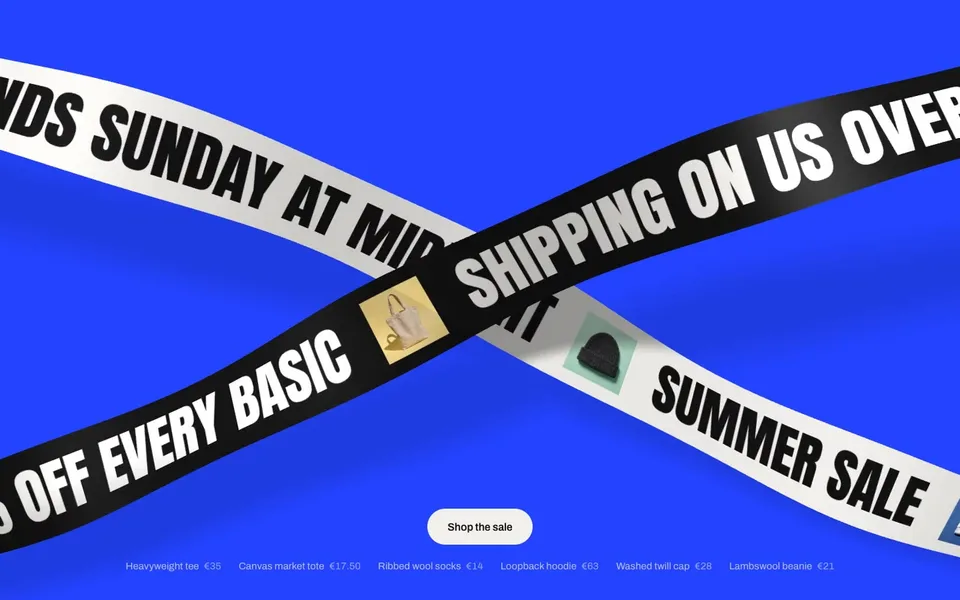
If your bar needs to do something else, such as show a live countdown in one message or switch by market, Klorr's Liquid code generator can write that variation from a description. For a bar that tracks progress toward free delivery, see the free shipping bar instead.
Questions, answered
How do I make the announcement bar scroll in Shopify?
Most themes' bars don't scroll sideways, so add a custom section with a CSS marquee, like the one in this post, to the header group and hide the theme's bar. No app is needed, and the animation runs on CSS.
How do I put an announcement section above the header in Shopify?
In the theme editor, add it inside the header section group and drag it above the Header entry in the sidebar. Themes from before 2023 don't have section groups, so there you render it from layout/theme.liquid above the header.
Does a scrolling announcement bar slow down my Shopify store?
A CSS marquee that animates transform adds very little work. Keep it light: no images in a slim bar, and no animation library. The script here only sets the speed and handles the pause button.
Is a scrolling announcement bar accessible?
It can be, with three things: a visible pause button, a still version for people who ask for reduced motion, and the duplicate text hidden from screen readers and from keyboard focus. Hover alone isn't enough, since touch screens have no hover.
Why does my marquee have a gap or jump?
Usually one of two things. A list narrower than the bar leaves a gap, fixed with min-width: 100% on each list. A jump comes from uneven spacing at the join, fixed by padding each list by the same amount as the gap between its items.